
Photo math on your computer, without a phone
Screenshot any problem on your screen — a PDF, an online quiz, a photo of your homework — and get the full working next to it. No second device, no retyping.
Add to Chrome — FreePhoto Math Solver does photo-based math solving on a computer: it installs as a Chrome or Edge extension and reads problems directly off your screen.
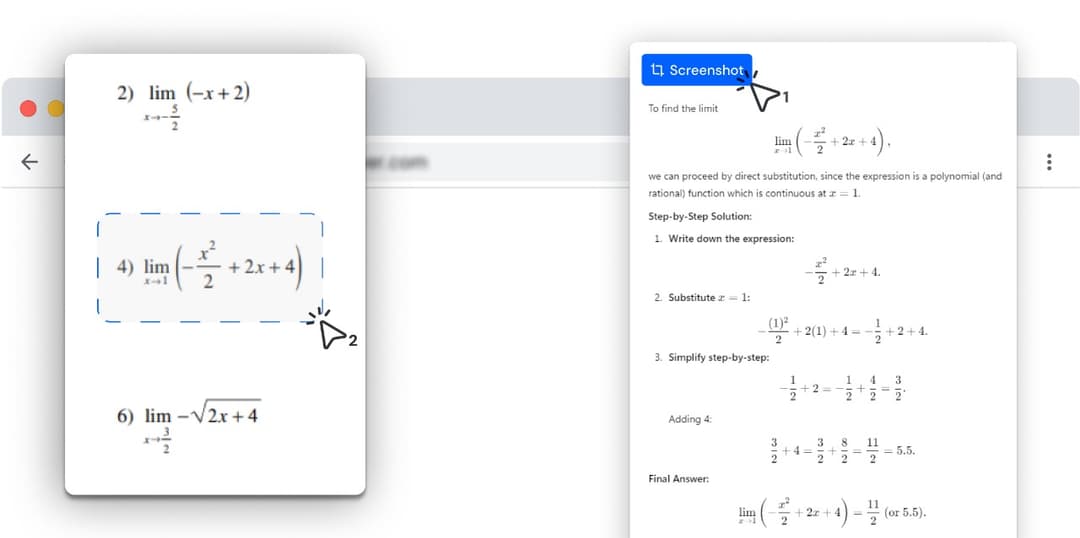
You drag a box around the problem wherever it appears — a PDF worksheet, a Canvas quiz, a lecture slide, or a photo of your handwritten homework opened in a tab — and the step-by-step solution appears in a sidebar beside it.
It runs in a desktop browser rather than on a phone, so it fits the work that already happens at a computer — PDFs, online quizzes, slides, and files you open in a tab.
How it works on a desktop
- 1
Install it in the browser you already use
One click from the Chrome Web Store. It works in Chrome, Edge, Brave, Opera, Vivaldi and Arc — anything built on Chromium — on Windows, macOS, Linux and ChromeOS.
- 2
Drag a box around the problem
Anything visible in the browser window works: a quiz question, an embedded image, a lecture slide, or a file you opened in a tab — drag a PDF, photo or EPUB straight in from your desktop and solve on the page.
- 3
Read the steps beside the problem
The solution opens in a sidebar on the same screen — the method used, every intermediate step, and the final answer. The problem stays visible while you read the working, which is the part a phone cannot do.
Browser extension vs phone app
Both approaches solve math from an image. This is what changes when the solver lives in the browser you are already working in.
| Browser extension (this) | Phone camera app | |
|---|---|---|
| A problem already on your screen | Drag a box around it in place | Photograph the monitor with a second device |
| PDFs, worksheets and ebooks | Open the file in a tab — PDF, image or EPUB — and solve directly on the page | Photograph the screen page by page |
| Complex typeset notation | Reads rendered pixels — no glare, no angle, no focus loss | Depends on lighting and a steady hand |
| Getting the answer into an online assignment | Copy from the sidebar into the box beside it | Read off the phone and retype |
| School-issued Chromebook | Installs from the Chrome Web Store like any extension | Needs a phone, which many classrooms do not allow |
| Handwritten homework | Photograph it, open the image in a tab, and it reads the handwriting | Point the camera straight at the page |
| Subjects it covers | Anything on screen — maths, physics, chemistry, biology, history | Whatever the app was built for |
| Solving while away from a computer | Needs a desktop browser | Works anywhere the phone does |
Try it on the problem you have open right now
Screenshot any problem on your screen — a PDF, an online quiz, a photo of your homework — and get the full working next to it. No second device, no retyping.
Why photo math solvers are usually phone apps
Photo-based math solving grew up on phones because phones have cameras. The original workflow assumes the problem is printed on paper in front of you: point the camera at the page, and the app reads it.
That assumption stopped matching how homework actually arrives. Assignments are PDFs, LMS quizzes, shared slide decks and screenshots in a group chat — they are already on a screen, and usually a laptop screen. The phone workflow then adds a step that exists for no reason: pick up a second device, photograph your own monitor at an angle, wait for it to work through the glare, then read the answer off the phone and type it back into the computer.
Photomath, the best-known app in this category, is built for iOS and Android. That is a reasonable place to build a camera-first product. It leaves the desktop case — where the problem is already rendered, in focus, at full resolution, three inches from your cursor — to something else.
What "on your computer" actually gets you
The screenshot is cleaner than any photograph. No glare, no keystoning, no focus hunt, no shadow from your own head across the page. The extension reads the pixels the page rendered, so notation that phone OCR routinely mangles — stacked fractions, nested radicals, summation limits, matrices — arrives intact.
The answer lands where the work is. The sidebar sits beside the problem rather than on a different device, so you can follow a step, look back at the original, and copy a result straight into the answer box without a transcription error in between.
And on a school-issued Chromebook, a browser extension is frequently the only kind of software a student is allowed to install — while the phone stays in a bag it is not allowed to leave.
Where on your screen it works
PDF worksheets, questions inside Canvas, Moodle, Blackboard and Google Classroom, images pasted into Google Docs or Notion, lecture slides, textbook pages on a publisher site, and screenshots someone sent you.
Local files count too. Drag a PDF, a photo or an EPUB from your desktop into a browser tab and the extension solves on that page like any other — which is how a photographed worksheet or a scanned textbook chapter gets handled.
The only requirement is that the problem is visible in a browser tab. If you can see it, you can draw a box around it.
That also means it is not limited to mathematics. The same box works on a chemistry question, a labelled diagram, a chart in a set of slides or a passage of a history source — it reads the region you selected and explains what is in it.
What it can solve
Every subject below has its own page with formulas, worked examples and practice problems.
What it runs on
- A Chromium-based desktop browser: Chrome, Edge, Brave, Opera, Vivaldi or Arc, on Windows, macOS, Linux or ChromeOS.
- Anything visible in a tab — a web page, an online quiz, a lecture slide, or a local PDF, image or EPUB dragged into the browser.
- A connection, because the working is generated when you snip.
- A computer. Away from one, a phone app is the tool for the job.
Frequently asked questions
Photomath is a product of its respective owner. Photo Math Solver is an independent product and is not affiliated with it.