
Solve math problems straight from a PDF
Open the worksheet in Chrome, drag a box around the problem, and read the working beside it. Nothing to upload, nothing to retype.
- Works inside Chrome’s own PDF viewer — online PDFs, Drive and Classroom files, email attachments.
- Reads the page as an image, so scanned and photographed worksheets work like digital ones.
- No copy-paste: exponents, fractions and roots arrive the way the page shows them.
- Local PDFs need one Chrome setting, switched on once.
Photo Math Solver is a PDF math solver that works inside Chrome’s PDF viewer, as a browser extension rather than an upload site.
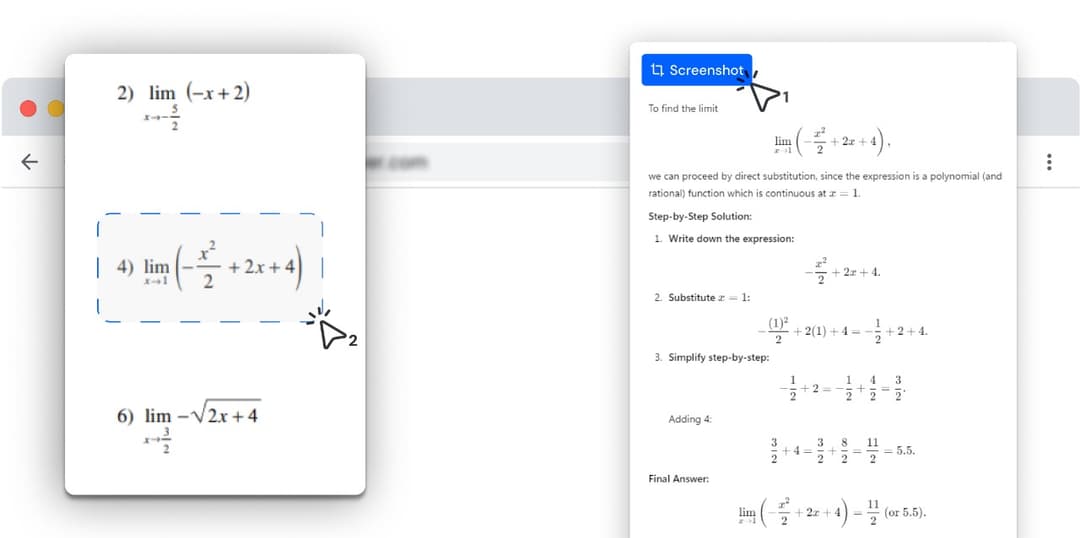
Open the PDF in a Chrome tab, drag a box around a problem, and the method and each step appear in a side panel while the page stays in view.
It solves what is inside the box, one problem or a few at a time, rather than taking the whole file at once.
How to solve a PDF problem
- 1
Open the PDF in Chrome
Click the link, open the attachment, or open it from Google Drive or your LMS. Anything that shows in Chrome’s PDF viewer works. For a PDF saved on your computer, drag it into a Chrome tab.
- 2
Drag a box around the problem
Press Alt+C or click the extension, then draw a box around the question — one problem, or a few on the same page. Zoom in first if the print is small; the clearer it looks on screen, the better it reads.
- 3
Follow the steps beside the page
The solution streams into Chrome’s side panel: the method, each step, and the answer. Scroll to the next problem and drag again.
Solving in the PDF vs uploading it
Most PDF math solvers are sites you upload a file to. This one reads the file where you already have it open.
| Extension in Chrome’s PDF viewer (this) | Upload-a-PDF solver site | |
|---|---|---|
| A PDF you already have open | Drag a box around the problem in place | Download it, then upload it to the site |
| Where the working appears | Side panel next to the page | A separate tab or site |
| Scanned or photographed worksheets | Reads the page image, no text layer needed | Depends on the site’s scanning |
| Subjects | Anything in the box — maths, physics, chemistry, biology | Usually maths only |
| Answering a whole file at once | One box at a time | Upload once, get every problem |
Try it on the problem you have open right now
Open the worksheet in Chrome, drag a box around the problem, and read the working beside it. Nothing to upload, nothing to retype.
Why copying math out of a PDF goes wrong
Copying an equation out of a PDF usually breaks it. Exponents drop onto the line, so x³ − 4x pastes as x3 − 4x. Fractions split across lines, and symbols turn into boxes or vanish. A scanned worksheet has no text to copy at all.
Reading the page as an image avoids all of that. The extension sees the problem exactly as the PDF viewer draws it, so stacked fractions, roots, limits and matrices arrive intact.
PDFs saved on your computer
Chrome keeps every extension away from local files until you allow it. To solve a PDF stored on your computer, open chrome://extensions, choose Details under Photo Math Solver, and turn on Allow access to file URLs. You only do this once.
PDFs you open from the web, Google Drive, Classroom, Canvas or an email attachment do not need the setting; they work as soon as they are open.
Where your PDFs come from
Homework packets from an LMS, lecture notes, past papers, textbook chapters, and scans of paper worksheets. If the file opens in Chrome, every page is solvable.
A PDF open in a desktop app such as Adobe Acrobat or Preview is outside the browser, so drag the file into a Chrome tab instead. On a Chromebook, PDFs open in the Gallery app by default; switching them to Chrome is covered on the Chromebook page.
What it can solve
Every subject below has its own page with formulas, worked examples and practice problems.
What it works on
- PDFs open in Chrome’s built-in PDF viewer, on Windows, macOS, Linux or ChromeOS.
- Local PDFs once Allow access to file URLs is on for the extension.
- Digital and scanned PDFs alike; very faint or blurry scans read less reliably, as with any solver.
- A connection, because the working is generated when you snip.