
Photo Math Solver vs the alternatives
Photo Math Solver explains whatever you drag a box around on screen, in any subject, a step at a time. Here is how that compares with the six tools people most often weigh it against.
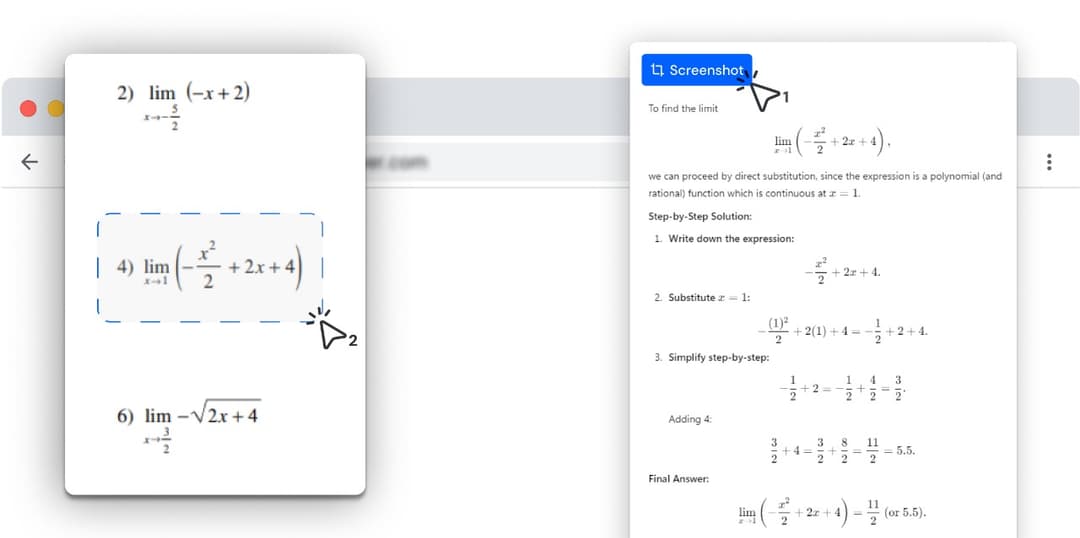
- Photo Math Solver is a browser extension: drag a box around anything on screen and read the method one step at a time.
- It is not limited to maths — physics, chemistry, biology, history, anything you can put in the box.
- Most of the tools below are apps or websites you go to with a problem. This one opens where the problem already is.
- Pick the comparison that matches what you are using now; each page describes both products side by side.
Photo Math Solver is a Chrome and Edge extension that explains whatever you drag a box around on your screen — an equation, a diagram, a chemistry question, a passage of history — step by step, in the tab you are already in.
The comparisons here set it beside the six study tools people most often weigh it against — Mathway, Gauth, Question.AI, Symbolab, Wolfram|Alpha and ChatGPT — on what each one is built for and how each one takes a problem in.
It runs in a desktop Chromium browser, which is where online coursework, PDFs and course pages already live.
Pick the tool you are weighing this against
Ordered by how many people are searching for each one. Every one of them says where the other tool wins.
- vs MathwayPhoto Math Solver is a browser extension that reads a problem straight off the tab you already have open — a PDF, an online assignment, a lecture slide — and explains it a step at a time.
- vs GauthPhoto Math Solver is a browser extension for homework that is already on a screen: draw a box around a question and it lays out the method, not only the answer.
- vs Question.AIPhoto Math Solver is a browser extension that turns anything you select on screen into a worked explanation — the method named, each step on its own line, in plain language.
- vs SymbolabPhoto Math Solver is a browser extension that explains whatever you drag a box around — an equation, a diagram, a chemistry question, a paragraph of history — step by step, in the tab you are already in.
- vs Wolfram|AlphaPhoto Math Solver is a browser extension that answers a problem exactly as it appears on your screen, without any part of it being retyped into an input box.
- vs ChatGPTPhoto Math Solver is a browser extension that explains one selected problem at a time, in the tab where you found it, without anything being pasted anywhere.
Three shapes of study tool
Before the individual comparisons, the structural difference — most of the choice comes down to which of these three shapes suits how you work.
| Browser extension (this) | Phone app or website | |
|---|---|---|
| Where you use it | In the tab the problem is already in | In an app, or on a site you go to |
| Working alongside an online assignment | Question, working and answer box on one screen | A second device, or a second tab |
| Subjects covered | Anything on screen — maths, physics, chemistry, biology, history | Maths only for Mathway, Symbolab and Photomath; every subject for Gauth and Question.AI |
| Typing notation | Never — stacked fractions and matrices are read as pixels | A maths keypad, a query box, or a camera |
| Explanation depth | Turn the detail up or down on the same problem as you read | One format per tool, or a follow-up question in chat |
| Problems written on paper | Photograph it, open the image in a tab, drag a box | Point the camera at it — what Photomath and Gauth are built for |
| School Chromebooks | Installs from the Chrome Web Store, often the only installable software | Websites work; phone apps sit on a device the school does not manage |
| Phone apps | Desktop browsers | iOS and Android |
| Best for | Understanding whatever is in front of you on a computer | Problems on paper, and studying away from a desk |
Try it on the problem you have open right now
Free to install, and it works on the tab you already have open. Drag a box around a problem and the working appears beside it.
What it can solve
Every subject below has its own page with formulas, worked examples and practice problems.
Frequently asked questions
All product names here belong to their respective owners. Photo Math Solver is an independent product and is not affiliated with any of them.