
Photo Math Solver vs ChatGPT
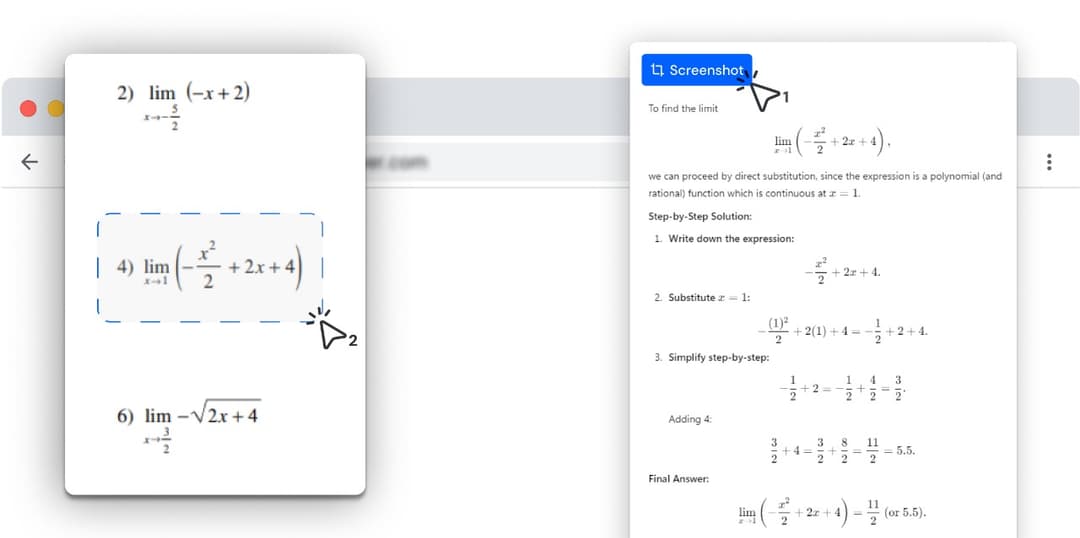
ChatGPT is powerful, and it lives in another tab. Photo Math Solver lives in this one — drag a box around the single question you are stuck on and read the method beside it, without pasting anything anywhere.
- Both are AI, and both can read a screenshot of a homework problem.
- ChatGPT is a chat window you go to: switch tab, paste the screenshot, describe what you want.
- This is a box you drag around one question, in the tab you are already reading it in.
- The working comes back typeset, one step per line, at a level of detail you change while you read it.
Photo Math Solver is a browser extension that explains one selected problem at a time, in the tab where you found it, without anything being pasted anywhere.
Where a chat assistant takes a screenshot of a whole page and answers it in a conversation, this takes one problem at a time and returns the method named, typeset, one step per line, at a depth you control.
It runs in a desktop Chromium browser and handles any subject on screen — one question per snip, rather than a page at a time.
Which one should you install?
Photo Math Solver is for
- Working through problems one at a time, in the tab they are already in.
- Getting the method laid out rather than a paragraph you have to unpack.
- Notation that is awkward to describe in words — stacked fractions, matrices, diagrams.
- Staying on the assignment instead of moving between a chat and a form.
ChatGPT is for
- Open-ended conversation about a topic, across anything you can think of.
- Writing, planning, coding and research well beyond a homework question.
- Asking follow-ups in your own words and steering an answer over several turns.
- Working on a phone or a desktop, in a chat you can come back to later.
Photo Math Solver and ChatGPT, side by side
Both are AI that can read a problem from an image. The rows below are where the two are shaped differently.
| Photo Math Solver | ChatGPT | |
|---|---|---|
| Steps to an answer | Drag a box, read the method — two steps | Switch tab, screenshot, paste, describe the ask, wait, scroll back |
| How much it takes at once | The one question you selected | Whatever is in the screenshot, answered together |
| Explanation depth | Turn the detail up or down on the same problem as you read | Ask again, in words, and get a fresh answer |
| Where you use it | In the tab the problem is already in | In the chat, in its own tab or app |
| How the working is rendered | Typeset notation, one step per line, each step in plain language | A written answer in the conversation |
| Subjects it covers | Anything on screen — maths, physics, chemistry, biology, history | Anything you can ask about |
| Practice problems | Built from the problem you just solved | Ask for more and it will write some |
| Beyond coursework | Explaining what is on your screen | Writing, planning, coding, research, conversation |
| Phone apps | Desktop browsers | iOS and Android |
| Best for | The single question in front of you, explained where it is | Open-ended work of almost any kind |
Try it on the problem you have open right now
Free to install, and it works on the tab you already have open. Drag a box around a problem and the working appears beside it.
What is different here
One problem at a time
A screenshot of a whole worksheet comes back as one long reply covering six questions, and finding the one you were stuck on means scrolling through five you were not. Selecting a single problem gets a single explanation, and the next one is another drag of the box.
No tab to switch to
The question, the working and the box you type your answer into stay on one screen. Nothing is screenshotted, pasted, described or copied back — which is where the time actually goes.
Nothing has to be described in words
A stacked fraction, a matrix, a labelled diagram, a chart in a lecture PDF: you draw a box around it rather than explaining what it looks like. The prompt is the selection.
Depth is a control, not another prompt
The same problem reads as four lines when you are checking your own answer and as a full walkthrough when you have no idea where to start — switched as you read, without asking again.
Laid out to be followed
Typeset notation rather than flattened plain text, one step per line rather than a paragraph, and a sentence saying what each step did, so the step you got wrong is findable.
How it compares with the other solvers
Same format: prices, a feature table, and where the other tool wins.
- vs MathwayPhoto Math Solver is a browser extension that reads a problem straight off the tab you already have open — a PDF, an online assignment, a lecture slide — and explains it a step at a time.
- vs GauthPhoto Math Solver is a browser extension for homework that is already on a screen: draw a box around a question and it lays out the method, not only the answer.
- vs Question.AIPhoto Math Solver is a browser extension that turns anything you select on screen into a worked explanation — the method named, each step on its own line, in plain language.
- vs SymbolabPhoto Math Solver is a browser extension that explains whatever you drag a box around — an equation, a diagram, a chemistry question, a paragraph of history — step by step, in the tab you are already in.
- vs Wolfram|AlphaPhoto Math Solver is a browser extension that answers a problem exactly as it appears on your screen, without any part of it being retyped into an input box.
See all comparisons — including prices across every tool here.
What it can solve
Every subject below has its own page with formulas, worked examples and practice problems.
Frequently asked questions
ChatGPT is a product of its respective owner. Photo Math Solver is an independent product and is not affiliated with it.