
Photo Math Solver vs Symbolab
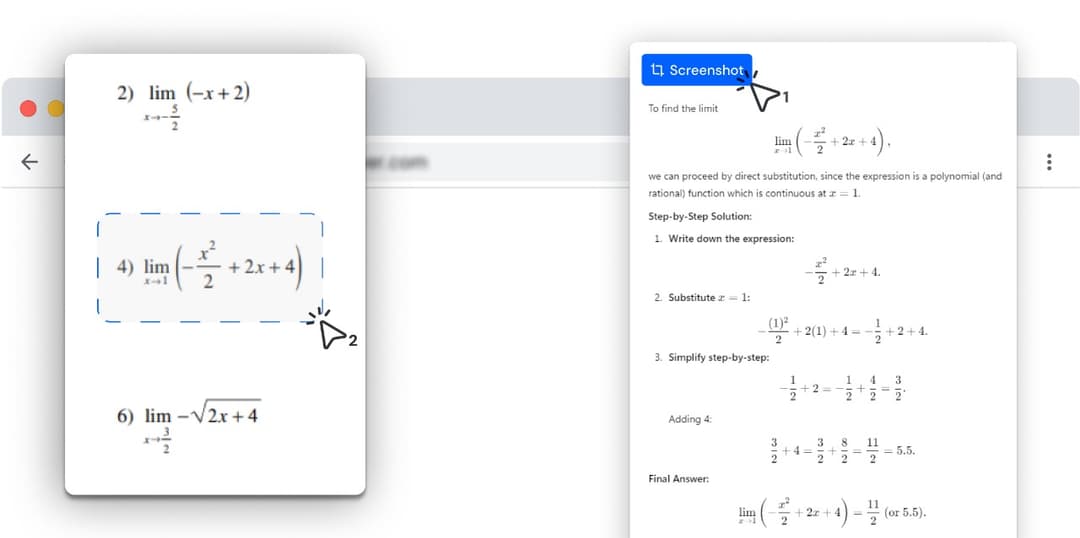
Symbolab is built for a whole mathematics course. Photo Math Solver is built for the thing on your screen right now — drag a box around it, in any subject, and read the method one step at a time without leaving the tab.
- Both let you drag a box around a problem on the page you are reading and answer it there.
- Symbolab is a mathematics platform: named solvers, a graphing calculator, a notebook, a practice library.
- This is one extension, and it is not limited to mathematics — physics, chemistry, biology, history, anything you can put on screen.
- The working comes back typeset, one step per line, at a level of detail you change while you read it.
Photo Math Solver is a browser extension that explains whatever you drag a box around — an equation, a diagram, a chemistry question, a paragraph of history — step by step, in the tab you are already in.
You select the part of the screen you are stuck on, and the method comes back named and typeset, one step per line, at a depth you can turn up when you are lost and down when you are only checking yourself.
It runs in a desktop Chromium browser, which is where the coursework, the PDFs and the course pages already are.
Which one should you install?
Photo Math Solver is for
- Understanding one problem at a time, on the page you are already reading.
- Anything that appears on your screen, in any subject, not mathematics alone.
- Following a named method step by step, with the detail level under your control.
- Practising the thing you just got wrong, from problems built out of that question.
Symbolab is for
- Working through an entire mathematics course with a single tool.
- Graphing and plotting, which Symbolab has built out as a full calculator.
- Reaching for a solver built around one specific operation or topic.
- Studying on a phone, and keeping a notebook of everything you have solved.
Photo Math Solver and Symbolab, side by side
The two products start the same way — drag a box, read the answer where you are. The rows below are where they are shaped differently.
| Photo Math Solver | Symbolab | |
|---|---|---|
| Subjects it covers | Anything on screen — maths, physics, chemistry, biology, history | Mathematics |
| Explanation depth | Turn the detail up or down on the same problem as you read | A step-by-step format per solver |
| How you give it a problem | Drag a box around it on any tab | Drag a box, or type it into the site |
| Where the answer appears | In place, over the page you are on | In place, in a side panel |
| Step-by-step working | Method named, every step shown | Method named, every step shown |
| How the working is rendered | Typeset notation, one step per line, each step in plain language | Typeset notation with the steps expanded |
| Practice problems | Built from the problem you just solved | A library organised by topic |
| Shape of the product | One extension that sits in the browser | A study platform: solvers, graphing, notebook, practice |
| Phone apps | Desktop browsers | iOS and Android |
| Best for | Understanding whatever is in front of you, whatever the subject | A full mathematics toolkit for a whole course |
Try it on the problem you have open right now
Free to install, and it works on the tab you already have open. Drag a box around a problem and the working appears beside it.
What is different here
It is not only for mathematics
The box you drag does not care what is inside it. A titration question, a circuit diagram, a paragraph of a history source, a chart in a lecture PDF — snip it and get the same step-by-step treatment you get on a quadratic. Most study tools ask you to pick the subject first.
Depth is a control, not a format
The same problem reads as four lines when you are checking your own answer and as a full walkthrough when you have no idea where to start. You change it while you are reading, on the problem in front of you, rather than choosing a mode before you begin.
The working is laid out to be read
Typeset notation rather than flattened plain text, one step per line rather than a paragraph, and a sentence saying what each step did and why. The point is that you can follow the method afterwards, not only see the result.
Practice comes out of your own problem
You factored this quadratic and got it wrong, so here are three more shaped like it, immediately, without going and finding the right corner of a library.
There is nothing to learn first
Install it, drag a box, read the answer. There is no surface to navigate and no decision about which of forty tools fits this particular question.
How it compares with the other solvers
Same format: prices, a feature table, and where the other tool wins.
- vs MathwayPhoto Math Solver is a browser extension that reads a problem straight off the tab you already have open — a PDF, an online assignment, a lecture slide — and explains it a step at a time.
- vs GauthPhoto Math Solver is a browser extension for homework that is already on a screen: draw a box around a question and it lays out the method, not only the answer.
- vs Question.AIPhoto Math Solver is a browser extension that turns anything you select on screen into a worked explanation — the method named, each step on its own line, in plain language.
- vs Wolfram|AlphaPhoto Math Solver is a browser extension that answers a problem exactly as it appears on your screen, without any part of it being retyped into an input box.
- vs ChatGPTPhoto Math Solver is a browser extension that explains one selected problem at a time, in the tab where you found it, without anything being pasted anywhere.
See all comparisons — including prices across every tool here.
What it can solve
Every subject below has its own page with formulas, worked examples and practice problems.
Frequently asked questions
Symbolab is a product of its respective owner. Photo Math Solver is an independent product and is not affiliated with it.