
Photo Math Solver vs Wolfram|Alpha
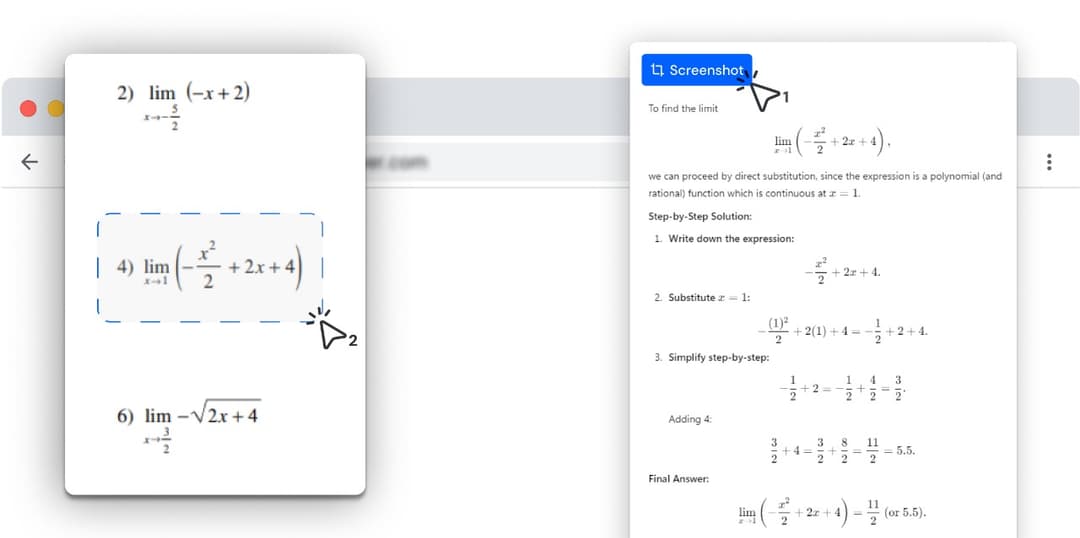
Wolfram|Alpha is a computational engine you ask a question. Photo Math Solver reads the question off the page you are already on — drag a box around it, in any subject, and follow the method one step at a time.
- Wolfram|Alpha is built around its query box: you state the problem in its language and it computes an answer.
- This is a browser extension: you drag a box around the problem where it already is and never restate it.
- It is not limited to maths — physics, chemistry, biology, history, anything you can put on screen.
- The working comes back typeset, one step per line, at a level of detail you change while you read it.
Photo Math Solver is a browser extension that answers a problem exactly as it appears on your screen, without any part of it being retyped into an input box.
Because it reads the region of the screen you select, a stacked fraction or a matrix never has to be restated in typed notation before it can be answered.
It runs in a desktop Chromium browser and covers any subject that turns up there, from a chemistry question to a passage of a history source.
Which one should you install?
Photo Math Solver is for
- Coursework that is already open in a browser tab on a computer.
- Anything that appears on your screen, in any subject, not mathematics alone.
- Notation that is awkward to type — stacked fractions, matrices, integrals in an image.
- Following a named method step by step, with the detail level under your control.
Wolfram|Alpha is for
- Computation that goes well past coursework — Wolfram is a research-grade engine.
- Questions across chemistry, physics, statistics, geography, finance and much else.
- Anyone comfortable writing a query in Wolfram’s own input language.
- Plotting, symbolic manipulation and results that come with data attached.
Photo Math Solver and Wolfram|Alpha, side by side
Both answer hard questions and show working. The rows below are where the two products are shaped differently.
| Photo Math Solver | Wolfram|Alpha | |
|---|---|---|
| How the question gets in | Drag a box around it where it already is | Typed into the query box in Wolfram’s input language |
| Where you use it | In the tab the problem is already in | On wolframalpha.com, or in the mobile apps |
| Explanation depth | Turn the detail up or down on the same problem as you read | A step-by-step walkthrough on the paid tier |
| Subjects it covers | Anything on screen — maths, physics, chemistry, biology, history | A very wide computational knowledge base across the sciences and beyond |
| Depth of computation | Coursework-level mathematics, explained | Research-grade — symbolic algebra, data, plots, unit-aware results |
| How the working is rendered | Typeset notation, one step per line, each step in plain language | Typeset results, with a step-by-step view on the paid tier |
| Practice problems | Built from the problem you just solved | Not part of what Wolfram|Alpha sets out to do |
| Graphing and plotting | Not offered | Extensive, and one of the reasons people reach for it |
| Phone apps | Desktop browsers | iOS and Android |
| Best for | Understanding whatever is in front of you, whatever the subject | Computing an answer to a question you can state precisely |
Try it on the problem you have open right now
Free to install, and it works on the tab you already have open. Drag a box around a problem and the working appears beside it.
What is different here
Nothing gets restated
A nested fraction, a matrix, an integral inside a scanned worksheet — you select it as pixels rather than translating it into typed notation first. Restating a problem slightly wrong produces a correct answer to the wrong question, and that is a common way to lose marks.
It comes to the page
The question, the working and the box you type your answer into stay on one screen. There is no second tab holding a query and no copying back and forth.
It is not only for mathematics
The box you drag does not care what is inside it. A chemistry question, a circuit diagram, a paragraph of a history source, a chart in a lecture PDF — snip it and get the same step-by-step treatment you get on a quadratic.
Homework-shaped output
The method is named and each manipulation sits on its own line, so the step you got wrong is findable. That is a different job from producing the most complete possible result.
Depth is a control, not a format
The same problem reads as four lines when you are checking your own answer and as a full walkthrough when you have no idea where to start.
How it compares with the other solvers
Same format: prices, a feature table, and where the other tool wins.
- vs MathwayPhoto Math Solver is a browser extension that reads a problem straight off the tab you already have open — a PDF, an online assignment, a lecture slide — and explains it a step at a time.
- vs GauthPhoto Math Solver is a browser extension for homework that is already on a screen: draw a box around a question and it lays out the method, not only the answer.
- vs Question.AIPhoto Math Solver is a browser extension that turns anything you select on screen into a worked explanation — the method named, each step on its own line, in plain language.
- vs SymbolabPhoto Math Solver is a browser extension that explains whatever you drag a box around — an equation, a diagram, a chemistry question, a paragraph of history — step by step, in the tab you are already in.
- vs ChatGPTPhoto Math Solver is a browser extension that explains one selected problem at a time, in the tab where you found it, without anything being pasted anywhere.
See all comparisons — including prices across every tool here.
What it can solve
Every subject below has its own page with formulas, worked examples and practice problems.
Frequently asked questions
Wolfram|Alpha is a product of its respective owner. Photo Math Solver is an independent product and is not affiliated with it.